
Once you’ve have an eBay account as well as a Paypal Account. What you should do next is to link this two account together. Here is how you can do it.

1. Go to http://www.ebay.com (This is at the US site not Malaysian Site)
2. Click on My Ebay at the top right corner.

3. Sign in to your eBay account

4. In your account overview, head over to MY ACCOUNT and select ADDRESSES
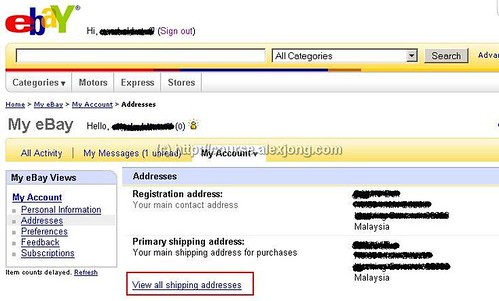
5. Click on View All Shipping Addresses
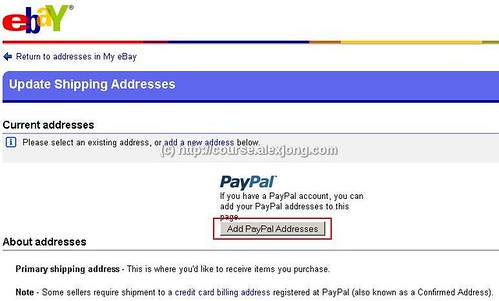
6. Click on Add PayPal Addresses
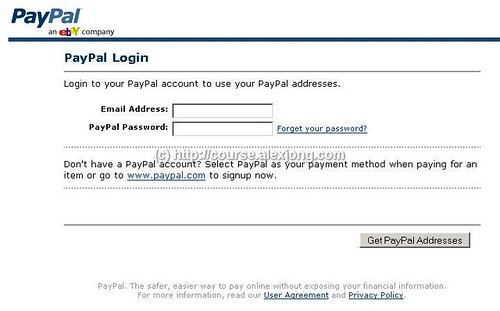
7. Sign in to your PayPal account
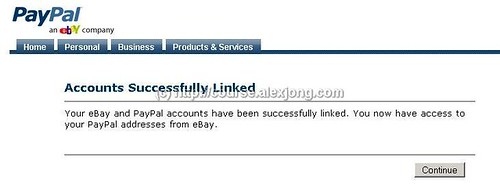
8. Upon signing in correctly you should get this Account Successfully Linked message. Click on Continue.
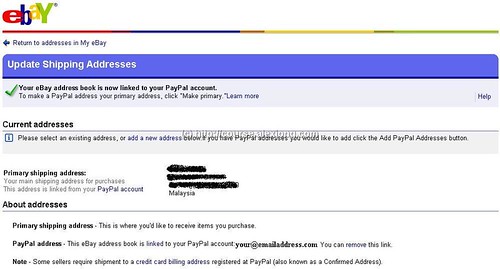
Upon clicking continue. It will bring you back to your eBay address. Thus you’ve completed linking your eBay account and PayPal Account.
Next thing we should do, is creating a seller account.
[…] 2. I’ve already got an eBay account, and currently selling on eBay. Am I eligible? No you are not. But if you still would like to participate in this Light & Easy Course, what you can do is to create a new eBay account and I will follow up with you from there to guide you on how to sell from this course. 3. I’ve already gotten a verified PayPal account but linked to another different eBay account, can it be used or do I still need to create a new account? Yes it can be used. All you need to do is to link it once again to your new account. You can see how it can be done from here. […]
[…] where by in session 1 you are suppose to :- 1. Create eBay Account 2. Create PayPal Account 3. Link eBay & PayPal Account 4. Creating A Seller’s […]